sarynprime.com
  • Beauty
  • Food
  • Health
  • Money
  • Tech
  • Contact
  • English
    • Polski
    • Deutsch
    • Français
    • Português
    • Español
    • Русский

How to Register a Brand in the EU: Key Steps

20.08.2025

Jabra Elite 7 Pro earphones review – great quality for your music and your calls

30.07.2025

Bose SoundLink Flex speaker review – excellent sound you can take anywhere

30.07.2025
sarynprime.com
  • Beauty

    How to clean hairbrushes in three easy steps

    03.07.2025

    Is there any such thing as a pain free wax?

    10.06.2025

    14 clever uses for shampoo and conditioner

    04.06.2025

    Have we really been applying our DEODORANT all wrong?

    02.06.2025

    How to get perfect eyebrows at home

    21.05.2025
  • Food

    How to cook red cabbage

    27.07.2025

    How to cook a ham: How to prepare and boil gammon

    24.07.2025

    How to cook broad beans

    20.06.2025

    How to cook jackfruit

    14.06.2025

    How to sterilise jars and bottles

    08.06.2025
  • Health

    What is the 1,000 calorie meal diet?

    06.07.2025

    The best time to eat breakfast, lunch and dinner if you want to lose weight

    25.06.2025

    Should you eat before or after a workout? What the experts say

    23.06.2025

    How to lose weight in your face, according to the experts

    14.06.2025

    30-day squat challenge: How to do the perfect squat

    12.06.2025
  • Money

    Turning off ‘phantom’ appliances could save you big on your energy bills

    23.07.2025

    How to improve your credit score fast – 17 tips from our finance expert

    05.07.2025

    How to save money on petrol and diesel – 18 ways to reduce your fuel costs

    04.07.2025

    The 7 most expensive household items to leave on standby

    28.06.2025

    Cheap takeaways: 9 ways to save money on takeaway food

    27.06.2025
  • Tech

    Jabra Elite 7 Pro earphones review – great quality for your music and your calls

    30.07.2025

    Bose SoundLink Flex speaker review – excellent sound you can take anywhere

    30.07.2025

    Safety and quality of virtual space

    29.07.2025

    Hiring Full-Stack Developers in 2022: skills to watch for

    08.07.2025

    AirPods 3rd Gen review – a new design and better sound

    01.07.2025
  • Contact
  • English
    • Polski
    • Deutsch
    • Français
    • Português
    • Español
    • Русский
sarynprime.com
Home » Microsoft Surface Go 3 review – Windows 11 tablet that can be used as a laptop
Tech

Microsoft Surface Go 3 review – Windows 11 tablet that can be used as a laptop

Tobias ToddBy Tobias Todd17.05.20254 Mins Read
Facebook Twitter Pinterest LinkedIn WhatsApp Reddit Tumblr Email
Share
Facebook Twitter LinkedIn Pinterest Email

Windows 11 is here and there are plenty of devices running the new operating system including Microsoft’s own Surface Go 3 tablet which can also be used like a laptop.

Here you’re getting the convenience and portability of a tablet and the power of Windows 11 in the same unit.

Now let’s be clear, this isn’t as powerful as the desktop or laptop but there is enough under the hood to get plenty done, stay connected and keep yourself entertained.

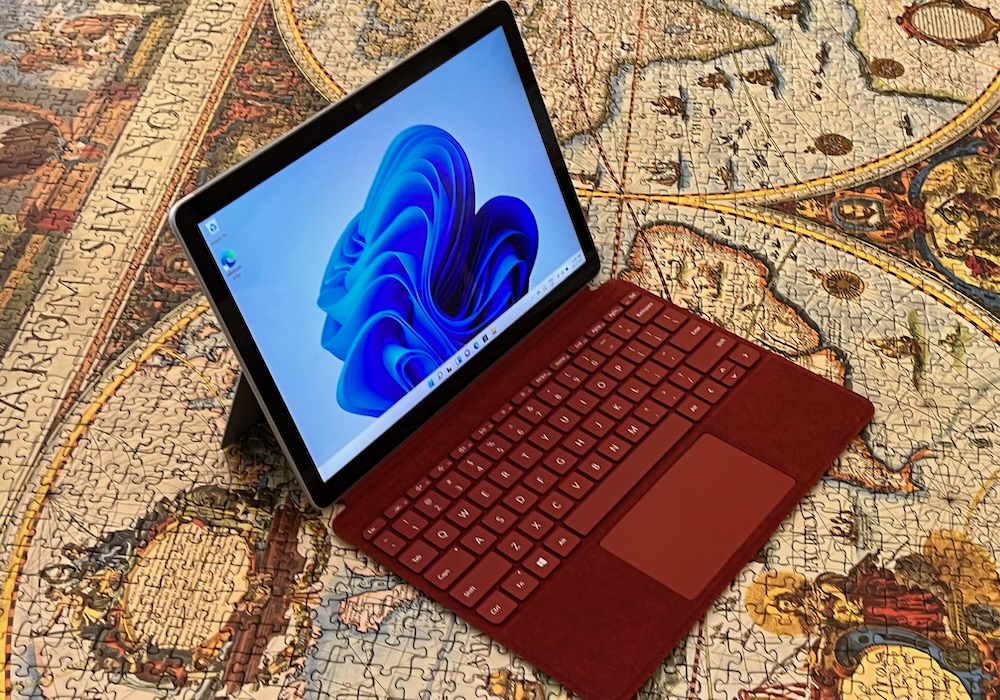
The device has a 10.5-inch Full HD (1920 x 1080) PixelSense touchscreen as well as an adjustable kickstand so it can be positioned comfortably.

It has a 3:2 aspect ratio which means it’s squarer rather than wide and suitable for any number of tasks whether you are working on a document, using the browser or drawing on the screen.

This is the most portable Surface PC that Microsoft offers and it’s the right size for notetaking and sketching.

SurfaceGo3Review1

The Surface Go 3is powered by the dual-core Intel Pentium Gold 6500Y processor. It’s also available with the dual-core 10th Gen Intel Core i3 10100 Y processor.

It’s available with either 4GB or 8GB RAM.

Performance wise, the Surface Go 3 does punch above its weight and can get through most tasks.

SurfaceGo3Review5

But if you’re looking to do some high-end video editing, 3D animation or any type of rendering – they need a lot more power the Surface Go 3 can offer.

For a casual user or a student, the Microsoft Surface Go 3 is ideal.

On its own, the Surface Go 3 weighs just 544g.

SurfaceGo3Review3

A recommended accessory is the Type Cover which converts the device into a laptop with a full keyboard and trackpad so you can be even more productive.

The Type Cover connects magnetically to the edge of the Surface Go 3 and doesn’t need charging because it draws its power from the unit itself.

This also acts as a protective cover for the screen as well when you’re not using it and it’s available in a number of colours and textures.

SurfaceGo3Review4

For our review we also paired Microsoft’s mouse which is made of recycled plastic waste recovered from the oceans and waterways.

On the connectivity side, there is a USB-C port, a headphone Jack and a micro-SD card slot tucked away under the kickstand.

It would have been great if Microsoft had included a regular USB port – that would have been something that really separates it from other tablets.

It also comes with Microsoft’s magnetic charging port that some people may mistake for a SD card slot.

Users can charge using Microsoft’s own connector or through the USB C port which is what we did most of the time.

SurfaceGo3Review8

But the good news is you won’t have to charge it too often because it has a battery life up to 11 hours.

This means it’s great to have by your side all day or on a long flight.

One of the biggest features of the Surface Go 3 is Windows 11 which offers an all-new design and system structure.

Users can also optimise their screen space so they can be at their most productive.

SurfaceGo3Review10

Windows 11 also has built in security to keep you and your device safe.

It also offers secure access to your OneDrive cloud storage so you can access documents and files from anywhere.

The Microsoft Surface Go 3 tablet is available now and priced from $628 with 4GB RAM and 64GB eMMC storage and $846 with 8GB RAM and 128GB SSD storage.

SurfaceGo3Review9

The Type Covers are priced at $149.95 and $199.95 with the softer surface for more comfortable typing.

VERDICT

The Microsoft Surface Go 3 is a pocket rocket that’s perfect for everyday computing, staying connected, staying productive and staying entertained anywhere.

Share. Facebook Twitter Pinterest LinkedIn WhatsApp Reddit Tumblr Email
Tobias Todd
  • Website

Related Posts

Tech 30.07.2025

Jabra Elite 7 Pro earphones review – great quality for your music and your calls

30.07.2025

Bose SoundLink Flex speaker review – excellent sound you can take anywhere

Tech 29.07.2025

Safety and quality of virtual space

08.07.2025

Hiring Full-Stack Developers in 2022: skills to watch for

01.07.2025

AirPods 3rd Gen review – a new design and better sound

Tech 28.06.2025

Audio Technica ATH-CKS50TW wireless earphones review – the bass to beat

Leave A Reply Cancel Reply

Don't Miss
Beauty 04.06.2025

14 clever uses for shampoo and conditioner

Switch out your washing up liquid for shampoo and swap make up remover for a…

What is better for Cricut SVG or PNG?

29.05.2025

How to consolidate debt and reduce your monthly repayments

28.05.2025

How to make classic S’mores

09.04.2025

Scopri Winnita: La Soluzione ai Tuoi Problemi di Gioco Online

18.07.2025

Save money with homemade cleaning products

12.04.2025

OnCredit – best online loan in Sri Lanka

23.04.2025

Winnita Casino: La Soluzione ai Tuoi Problemi di Gioco Online

19.07.2025

Type above and press Enter to search. Press Esc to cancel.